Plans and how you get charged
Here is the simple idea: you pay for the paid work Atlas does, not for every click. Two limits matter.
1. Your monthly requests
Every account gets a set number of paid requests each month. This is the number you watch go down in your Profile.
| Plan | Price | Requests each month |
|---|---|---|
| Free | $0 | 10 |
| Pro | $29.99 / month | 100 |
| Premium | $49.99 / month | 300 |
| Max | $99.99 / month | 1000 |
Check yours anytime:
atlas get-subscription-statusWhat uses one request
The simple rule: you pay for each thing Atlas does for you, not for each time it looks. A run that looks at the market and decides to do nothing is always free. You use one request each time Atlas:
- Answers a paid tool. Ask for a paid thing, like a gamma exposure map, and that is one request. Free tools use none. A few paid things in the same message still count as one, not three.
- Opens a trade or sends a note. When a workflow acts, by placing a trade, sending you a buy or sell note, or sending an analysis note, that is one request.
- Changes a live trade. While a trade is running, Atlas can step back in and change it, like moving your take profit targets up or closing the rest early. Each real change is one request. If it looks and leaves the trade alone, it costs nothing.
So one trade is not always one request. A trade that Atlas opens and later adjusts twice uses three requests: one to open it, and one for each change. You pay for the work, whether it is a brand new trade or an update to one you already have.
What is free
Free tools never touch your count. They are capped at 60 calls a minute. Free tools include quotes, price history, the options chain, company numbers, estimates, calendars, who owns a stock, search, and looking at your own workflows and triggers. The tool tables mark each tool Free or Premium.
2. Trades per day
On top of your monthly requests, each workflow has a max trades per day limit. This one is about pacing your account, not cost.
- It counts new trades opened. A run that opens no trade does not use a slot, and changing a trade you already have does not either.
- When it hits the limit, the workflow pauses until the next trading day.
- Running it by hand does not count. The limit is only for automatic runs.
- Each copy has its own limit. Your copy runs on its own count, not the author's.
Putting it together
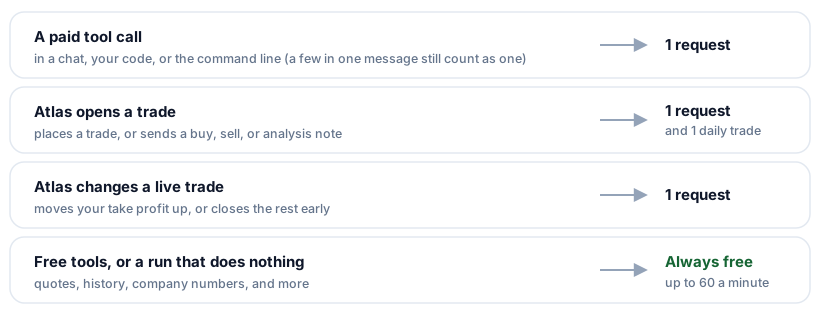
So an alert driven trading workflow that opens a trade uses one request and one of your daily trades. If Atlas later moves the take profit on that same trade, that is one more request (but not another daily trade). A run that looks and decides to do nothing uses neither.
Manage your plan from the Profile tab.